Legal Heir Certificate in Tamil Nadu: Cost, Documents, Online Application & Status Check

The legal heir certificate in Tamil Nadu (also called the varisu certificate or legal heir certificate TN) names the legal heirs of a person who has died. The Tahsildar issues it, and you apply online on the TN e-Sevai portal under service code REV-114.
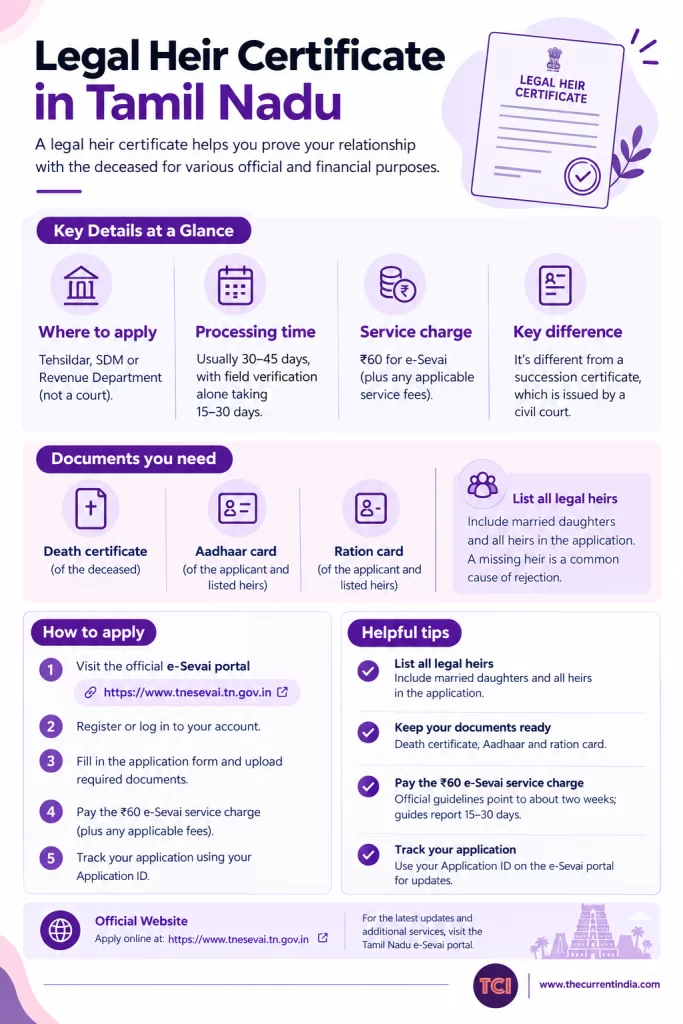
The e-Sevai service charge is ₹60. Official guidelines point to about two weeks, though guides report 15–30 days. You need the death certificate, identity proofs and the family ration card. You track the application with an Application ID (the legal heir certificate status check online).
Banks, pension offices and the Sub-Registrar ask for the certificate within weeks of a death, so gather your papers early.
Key takeaways
- List all legal heirs, including married daughters, on one application. A missing heir is a common cause of rejection.
- Expect a ₹60 e-Sevai service charge. Official guidelines point to about two weeks; guides report 15–30 days.
- Keep the death certificate, Aadhaar and ration card ready, then track progress with your Application ID.
What Is a Legal Heir Certificate in Tamil Nadu?
A legal heir certificate in Tamil Nadu is an official record that names the surviving family members entitled to a deceased person’s assets. The Tahsildar issues it for the Revenue Department. Tamil speakers call it the varisu certificate (வாரிசு சான்றிதழ்), and the online service code is REV-114.
You will need it for:
- Releasing a deceased person’s bank account or fixed deposits
- Pension and insurance claims
- Inherited property, where the registration office uses it to confirm whose signatures the deed needs
- Patta transfer
- Compassionate-ground employment
The Village Administrative Officer (VAO) and the Revenue Inspector (RI) check the family in the field. The certificate then lists each heir with name, age and relationship. It records relationships and does not divide the property or decide who gets what.
Our take: The certificate tells an office who the heirs are. A will or the law decides how the estate splits. Families who mix the two up end up at the wrong office with the wrong paperwork.
Every heir named on the certificate must take part in a sale of inherited property. A deed signed without one of them can face a challenge for years. List the heirs correctly the first time.
Succession Certificate vs Legal Heir Certificate: Which One Do You Need?
Who Can Apply for a Legal Heir Certificate TN?
The spouse, children and parents of the deceased can apply. Since a 2024 amendment to the state’s guidelines, Class II heirs, such as siblings, can also receive a certificate.
One family member applies for the whole family. The certificate lists every legal heir, including the applicant.
Under the Hindu Succession Act:
- The first-priority (Class I) heirs of a man include his widow, sons, daughters and mother, along with the children of a son or daughter who died before him.
- For a woman who dies without a will, her husband, sons and daughters come first.
- Daughters, including married daughters, hold equal coparcenary rights, which the Supreme Court confirmed in 2020.
Muslims and Christians follow their own succession laws, which can change the heir list. This is a simplified summary and does not replace legal advice.
List every heir. An estranged heir, an heir abroad and a minor heir all go on the list. Leaving out even one heir is a common cause of rejection, and the omission does the most harm once the certificate is issued. A minor heir needs a guardian reference when the family signs a deed later.
What Documents Are Required for a Legal Heir Certificate in Tamil Nadu?
You need the original death certificate, identity proof for the applicant and the heirs, a family ration card, proof of relationship, address proof and a self-declaration affidavit on stamp paper. Clear scans matter as much as the documents, because blurry uploads cause rejections.
Use this checklist before you log in:
| Document | Why it’s needed | Watch out for |
|---|---|---|
| Death certificate | Anchors the application to a registered death | Must come from the local body (Panchayat, Municipality or Corporation); a hospital summary alone isn’t enough |
| Aadhaar of applicant and heirs | Identity and CAN registration | Spell names as printed on Aadhaar |
| Smart ration card | Family identity proof | Deceased’s name should match the death certificate |
| Marriage / birth certificates | Proof of relationship (spouse or child) | Needed for each relationship you claim |
| Address proof | Confirms last residence, which decides the Taluk office | Electricity or water bill of the deceased works well |
| Self-declaration affidavit | Declares every legal heir | Use the format your Taluk office accepts, on non-judicial stamp paper |
Name mismatches trip up applicants. If the deceased’s name differs between the death certificate and the ration card, even by one letter, attach a notarised affidavit stating that both names belong to the same person. Applications without it come back rejected.
Our take: Do a two-minute name audit before you apply. Lay the death certificate, the ration card and each heir’s Aadhaar side by side and compare spellings. The check costs nothing and prevents a rejection.
Keep each scan as a clear PDF, and keep a second set of printed copies for the VAO’s visit.
How Do You Apply for a Legal Heir Certificate Online in Tamil Nadu?
You apply on the TN e-Sevai portal (tnesevai.tn.gov.in). Register a CAN, choose service REV-114 under the Revenue Department, list the heirs, upload the documents and pay the charge. The portal then gives you an acknowledgement with your Application ID, which you use to track progress.
The application has five stages:
- Register your CAN. The Citizen Access Number (some guides expand CAN as Common Application Number) is your permanent ID on the portal. Go to Citizen Login, choose Search CAN and enter your Aadhaar number. If none exists, register one with an OTP. You can’t open the REV-114 form without it.
- Open the service. Log in, go to the Revenue Department services and select REV-114 (Legal Heir Certificate).
- Fill in the details. Enter the deceased person’s name as on the death certificate, the date of death and the last address. Then add each heir with name, age, Aadhaar and relationship.
- Upload and pay. Attach the scanned documents and pay online by UPI, net banking or card. Download the acknowledgement slip and note the Application ID.
- Wait for verification, then download. The VAO and Revenue Inspector check the heir list in the field, and the Tahsildar approves it. After approval, you can download the certificate with the Tahsildar’s digital signature.
You can also apply offline.
How Do You Apply for a Legal Heir Certificate Offline in Tamil Nadu?
To apply offline, visit the Taluk (Tahsildar) office that covers the deceased’s last residence, or an e-Sevai centre, with your documents. The state’s 2022 guidelines expect legal heir applications to be filed online, so the office may file yours on the portal. The VAO and Revenue Inspector then verify the heir list, and the Tahsildar issues the certificate.
The offline process runs in seven steps:
- Find the right Taluk office. The deceased’s last residence decides the office, not your current address. If you’re unsure, ask at the local Village Administrative Office (VAO) or Panchayat office.
- Ask how they accept applications. Ask the Taluk office for the legal heir (varisu) certificate application. Many offices will send you to an e-Sevai centre or enter the application on the portal for you. If the office still offers a paper form, the charge is small. Older guides quote ₹60 plus a ₹2 stamp, so confirm the current amount at the counter.
- Fill in the details. Enter the deceased person’s name and date of death, the last address, and each heir’s name, age and relationship. Copy the spellings from the death certificate and Aadhaar cards.
- Attach the documents. Add the death certificate, identity and address proofs, family ration card, marriage or birth certificates and the self-declaration affidavit. Carry originals and photocopies. Some offices ask the other heirs to sign before a notary, so check before you go.
- Submit and collect the acknowledgement. Keep the receipt. It proves you filed, and the Application ID on it lets you follow progress.
- Wait for verification. The VAO visits to confirm the heir list, the Revenue Inspector does a second check, and both send reports to the Taluk office. The Tahsildar reviews the reports and decides.
- Collect the certificate. Once the Tahsildar signs, you can collect the original at the Taluk office or through a Common Service Centre where one is available.
Our take: Offline filing suits cases that need a conversation. If an heir is a minor, a name differs across documents or the family disagrees, you can explain the situation to officials in person. For a clean, simple case, online involves less hassle: no queue, and each stage shows on your screen.
Two situations need extra care:
- A minor heir: you may need a guardianship reference.
- A missing or contested heir: the Tahsildar can decline the certificate and direct you to a civil court for a succession certificate.
Online and offline compare like this:
| Online (e-Sevai, REV-114) | Offline (Taluk office) | |
|---|---|---|
| Where | TN e-Sevai portal or an e-Sevai centre | Taluk / Tahsildar office of the deceased’s last residence |
| Documents | Scanned PDFs uploaded | Originals and photocopies handed over |
| Fee | ₹0 department charge; ₹60 e-Sevai service charge (confirm on the payment screen) | Small form or service charge; confirm at the counter |
| Speed | About 2 weeks officially; 15–30 days reported | Same stages, and it may take a little longer |
| Tracking and delivery | Live status; digitally signed download | Receipt-based; can be tracked online with the Application ID; collect the original in person |
Legal Heir Certificate Cost in Tamil Nadu: What Will You Pay?
The legal heir certificate cost in Tamil Nadu is low. Government-based sources describe a ₹0 department charge and a ₹60 service charge at e-Sevai. Stamp paper or a notarised affidavit adds a little, so a simple filing costs about ₹80–₹160.
Sources disagree on the figures. Older guides describe an ₹20 affidavit plus ₹2 stamp for online filing and a ₹60 form plus ₹2 stamp offline. Several current guides call ₹60 “the fee.”
The best reading is that ₹60 is the e-Sevai service charge and the department charges nothing. If you apply from your own citizen login, the screen may still show ₹60, so confirm the amount at payment.
These components combine into two scenarios:
| Scenario | What’s included | Approx. total |
|---|---|---|
| Simple online filing | ₹60 service charge + stamp paper ₹20–100 | About ₹80–₹160 |
| With a notarised affidavit | ₹60 + stamp paper ₹100 + notary ₹200–500 | About ₹360–₹660 |
These totals are our own estimates, built from the component ranges above. Your bill depends on your district, the centre and whether you need a notary. The stamp paper and notary figures each come from limited sources, so treat them as ballparks. If anyone quotes thousands of rupees for an ordinary application, ask what they’re charging for.
How Long Does the Legal Heir Certificate Take in Tamil Nadu?
Under the state’s 2022 guidelines, the Revenue Inspector’s enquiry should take about a week. The Tahsildar should then issue the certificate within about another week, so around two weeks on paper.
Guides report 15 to 30 days in practice, so plan for up to a month. A complete file clears faster.
Your file passes through a few desks. Know which one holds it and you know who to call.
The dashed bar shows the extra time guides report. The official stages add up to about two weeks, and the rest comes from queries, missing documents or a field visit that falls through.
To shorten your wait, make the VAO’s visit easy:
- Keep the originals at home.
- Make sure you can reach the heirs named in the application.
- Fill in your contact number.
How Do You Do a Legal Heir Certificate Status Check Online?
To check your legal heir certificate status online, log in to the TN e-Sevai portal with your CAN, open Check Status or Track Application and enter the Application ID from your acknowledgement slip. The page shows which desk holds your file.
Follow these steps:
- Open tnesevai.tn.gov.in and choose Citizen Login.
- Sign in with your CAN and password.
- Click Check Status or Track Application.
- Enter the Application ID printed on the acknowledgement slip.
- Read the current stage and act on it.
If you prefer not to log in, the TN e-District site (tnedistrict.tn.gov.in) has an application status page. Enter the application number to see the applicant’s name, the request, the date and the current status.
Each status means this:
| Status you see | What it means | What you should do |
|---|---|---|
| Application Submitted | Portal has received your file | Wait; keep the slip safe |
| Under VAO Verification | Village Administrative Officer is checking the heir list | Be reachable for the field visit |
| Under RI Verification | Revenue Inspector is doing a second check | Wait |
| Under Tahsildar Approval | Final authority is reviewing | Wait |
| Approved | Certificate is ready | Download from My Applications |
| Rejected | Something failed verification | Read the reason, fix it, re-apply |
The wording on screen can differ from this list, so use it as a guide. Once the status shows Approved, go to My Applications, find the REV-114 entry and download the PDF. The file carries the Tahsildar’s digital signature.
The e-District site also has a Verify Certificate page that takes the certificate number and the mobile number. Banks and offices use it to confirm a certificate is genuine.
Run the same check when you buy inherited land. If the seller hands you a legal heir certificate and you can’t trace the application on the portal, pause the purchase.
Why Do Legal Heir Certificate Applications Get Rejected?
Most rejections come from five errors: mismatched names, an incomplete heir list, unclear scans, a death certificate from the wrong authority and an affidavit in the wrong format. Each has a simple fix, and none needs a lawyer.
- Name mismatch between documents: Attach a notarised affidavit confirming that both spellings refer to the same person.
- Incomplete heir list: Re-apply with the full list, including married daughters, minor children and separated siblings.
- Blurry or incomplete uploads: Re-scan with a scanner app instead of a phone photo, and keep each file as a clear PDF.
- Death certificate from the wrong source: Get it from the local body. A hospital discharge summary doesn’t replace it.
- Wrong affidavit format: Use the format available at your Taluk office on the correct stamp paper.
If the office rejects your application, read the reason, correct the problem and file again. You can also raise a grievance on the portal or meet the Tahsildar.
The state’s guidelines allow an appeal against the Tahsildar’s order within one year to the revenue authority above the Tahsildar. Reports name the Revenue Divisional Officer, so ask the Taluk office which officer hears appeals now.
Conclusion: Start With the CAN and the Name Audit
A legal heir certificate in Tamil Nadu costs little, and you can file online. Guides report a month or less for a complete file. Families run into trouble over a missing heir or a mismatched name.
Your action plan:
- Register your CAN on the TN e-Sevai portal today.
- Run a name audit across the death certificate, ration card and Aadhaar cards.
- List all heirs, including married daughters and minors.
- Pay the e-Sevai charge, save the Application ID and track the status every few days.
- Download the certificate with the digital signature and keep digital and printed copies.
This certificate is administrative proof and has no court decree behind it. If a bank asks for stronger proof or relatives contest the estate, talk to a qualified advocate about a succession certificate from a civil court. This article is general information and not legal advice.
Sources
The figures and procedures above were compiled from the following references, retrieved on 2026-10-27 unless a different date is shown. Fees, timelines and portal screens change and differ between sources, so confirm the latest details on the official TN e-Sevai portal before you apply. The two Tamil Nadu government orders on legal heir certificates (items 18 and 19) are linked below, and the figures here were cross-checked against court and news reports.
- 1acre.in, Legal Heir Certificate Tamil Nadu: Varisu Apply 2026, retrieved 2026-10-27, https://1acre.in/guides/tamil-nadu/legal-heir-certificate-tamil-nadu
- Government Schemes (egovtschemes.com), Tamil Nadu Varisu Certificate 2026: Online Apply (REV-114), Status Check & Download, retrieved 2026-10-27, https://www.egovtschemes.com/varisu-certificate/
- WillJini, How to Apply for a Legal Heir Certificate in India 2026: Its Name, Office and Fee by State, retrieved 2026-10-27, https://www.willjini.com/blog/how-to-apply-for-a-legal-heir-certificate-in-india/
- Investor Helpdesk, Varisu Certificate in Tamil Nadu: How to Get Legal Heir Certificate, retrieved 2026-10-27, https://investorhelpdesk.in/blog/legal-heir-certificate-tamil-nadu/
- PropResolve, Legal Heir Certificate in Tamil Nadu (Varisu Certificate), retrieved 2026-10-27, https://propresolve.com/legal-heir-certificate-in-tamil-nadu/
- IndiaFilings, Legal Heir Certificate Tamil Nadu: Process & Documents Guide, retrieved 2026-10-27, https://www.indiafilings.com/learn/legal-heir-certificate-tamil-nadu
- Enterslice, The Complete Process of Obtaining a Legal Heir Certificate in Tamil Nadu, retrieved 2026-10-27, https://enterslice.com/learning/legal-heir-certificate-tamil-nadu-process/
- NoBroker, Legal Heir Certificate Tamil Nadu: Process & Eligibility Guide 2026, retrieved 2026-10-27, https://www.nobroker.in/blog/legal-heir-certificate-tamilnadu/
- Outlook Money, How To Obtain Legal Heir Certificate In Tamil Nadu, retrieved 2026-10-27, https://www.outlookmoney.com/ampstories/retirement/news/how-to-obtain-legal-heir-certificate-in-tamil-nadu
- Verified.RealEstate Community, Legal Heir Certificate Online in Tamil Nadu: Verification, Download, and Status Checks, retrieved 2026-10-27, https://community.verified.realestate/article/legal-heir-certificate-online-in-tamil-nadu-verification-download-and-status-checks/
- National Portal of India (services.india.gov.in), Apply for Legal Heirship Certificate in Tamil Nadu, retrieved 2026-10-27, https://services.india.gov.in/service/detail/apply-for-legal-heirship-certificate-in-tamil-nadu
- Tamil Nadu e-Sevai Portal (TNeGA), official citizen services portal, https://www.tnesevai.tn.gov.in
- Indian Kanoon, R. Umasankari vs The Tahsildar (Madurai Bench, Madras High Court, 5 February 2026), on G.O. (Ms) No. 478 of 2022 and its 2024 amendment for Class II heirs, retrieved 2026-10-27, https://indiankanoon.org/doc/149559518/
- NewsBricks, Revenue Department Issued New Guidelines for Heirship Certificate, 30 September 2022, retrieved 2026-10-27, https://www.newsbricks.com/tamil-nadu/revenue-department-issued-new-guidelines-for-heirship-certificate/04064
- Chennai Properties, The Legal Heir Certificate: Importance, Guidelines, and Process in Tamil Nadu, retrieved 2026-10-27, https://www.chennairealties.in/legal-heir-certificate/
- Anantam IAS, TNeSevai: Citizen Login, Revenue Certificates, Status and Download, retrieved 2026-10-27, https://anantamias.com/tnesevai/
- Tamil Nadu e-District, application status page, https://tnedistrict.tn.gov.in/tneda/out_status.xhtml
- Government of Tamil Nadu, Revenue and Disaster Management Department, G.O. (Ms) No. 478, 29 September 2022 (legal heir certificate guidelines), retrieved 7 November 2024, https://cms.tn.gov.in/cms_migrated/document/GO/revenue_t_478_2022.pdf
- Government of Tamil Nadu, Revenue and Disaster Management Department, G.O. (Ms) No. 110, 13 March 2024 (amendment to G.O. 478), retrieved 7 November 2024, https://cms.tn.gov.in/cms_migrated/document/GO/revenue_t_110_2024.pdf
Interesting Reads

