Is there a super easy ways to do KWA online payment? Can you do Kerala water authority bill payment online? What is Kerala water authority login page?
What is Kerala water authority contact number and KWA quick pay or Kerala Water Authority quick pay? How to do Kerala Water Authority bill payment without registration?
Say goodbye to long queues and pay your water bill online in Kerala using the Kerala Water Authority KWA online payment quick pay option given on the official website.
You can also use third-party apps such as GooglePay, Paytm and PhonePe to make Kerala Water Authority bill payment online.
Read: Etapp KWA – Apply Online For New Water Connection In Kerala
Read on to know more about Kerala water authority bill payment online, how to pay water bill online using KWA quick pay option without login, debit cards, and Federal Bank AutoPay.
We have also compiled a list of third-party apps you can use to make Kerala Water Authority online bill payment.
Read: Kerala Land Tax Online: Payment, Receipt Download
Kerala Water Authority Bill Payment – FAQs
Find below a few FAQs on KWA online payment or Kerala Water Authority bill payment online, payment status check, how to pay your KWA bill using Federal bank or do KWA bill payment without registration.
How to pay Kerala Water Authority bill payment online with KWA Quick Payment
1. Consumer number
2. Consumer id
3. Registered mobile number
Once you find your Kerala Water Authority online bill, fill in your phone number and email id in the designated columns and then click on the Confirm Payment button.
Upon successful payment, you will be redirected to the website. Save the KWA bill payment receipt shown on the screen as PDF for future reference.
If you need to raise a complaint regarding Kerala water authority quick pay, please call the toll-free number – 1916
Can I make Kerala Water Authority bill payment using debit card?
1. Credit Card
2. Debit Card
3. Internet Banking
4. Bharat Bill Payment System
Can we pay water bill online in Kerala?
1. https://epay.kwa.kerala.gov.in/
If you need help with KWA quick pay, please call the toll-free number – 1916
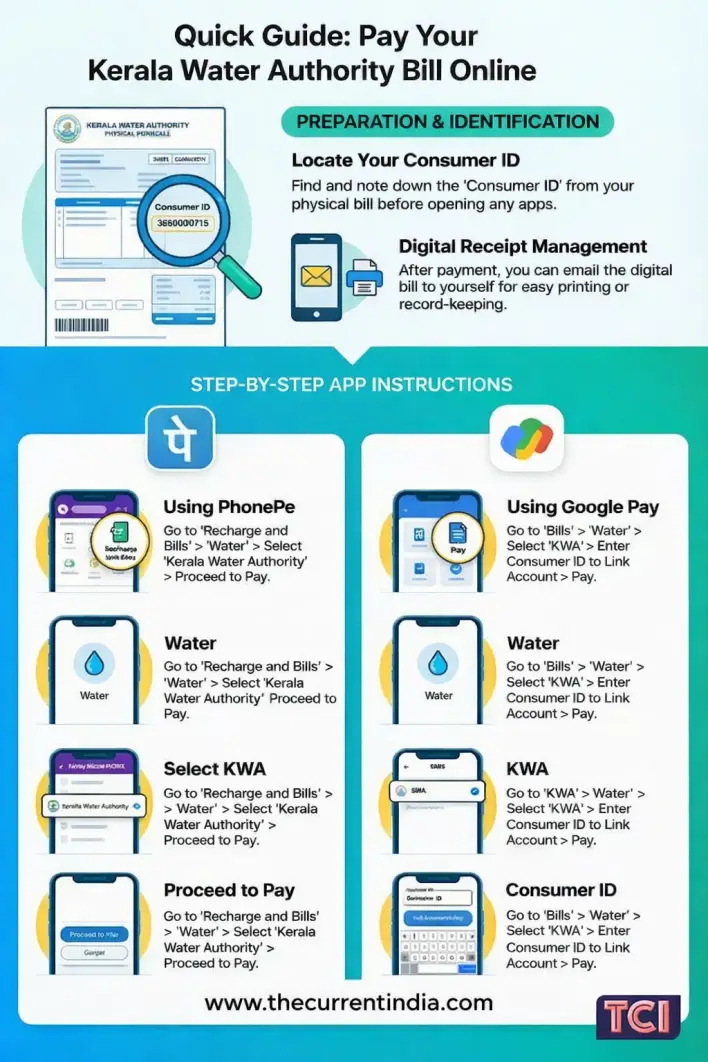
To pay using the above-mentioned apps, you need to login to the app of your choice, search for bill payment and then water bill.
Choose Kerala Water Authority as the operator, enter your consumer Id and pay the bill. You will get payment confirmation via SMS or email.
What is the official KWA online bill payment site?
1.https://epay.kwa.kerala.gov.in/ . This site allows you to do KWA bill payment without registartion and login.
How to do Federal Bank water bill payment?
Activate AutoPay
To activate AutoPay, send a text to the bank from your registered mobile number in the below format
ACTBILL<space>KWA<space>consumerID<space>Consumer no.<space>Last 3 digits of a/c no. to 989508888
Once you send the above message, your will receive a response from the bank. Once your receive the second message send the following SMS.
ACTBILL<space>YES<space>consumerID<space>Consumer no. to 9895088888. You will get a confirmation text from the Bank.
When you opt for AutoPay, you will receive e-mails and messages when:
1.The bill is ready for payment
2.Payment is done
3. Payment is failed due to insufficient funds or any such reasons
Deactivate AutoPay
To deactivate the facility, you can send a text in the below format to the bank.
DEACTBILL <space>KWA<space>Consumer ID <space> Consumer Number <space>last 3 digit of account no
What are the Kerala Water Authority contact numbers?
Emergency: +91-47-1232-2674
Toll Free Number For Complaints: 1916 / 18-004-255-313
Helpline: +91-47-1232-8654
WhatsApp: +91-94959-98258
Online Complaints: Janamithra
How to pay KWA water bill online using Paytm?
1. Log in to your Paytm app.
2. Choose ‘water’
3. Choose Kerala Water Authority (KWA) board
4. Enter your consumer id
5. Click on proceed
6. Your bill will displayed on the screen
7. Proceed to pay
8. Choose your payment option (Debit, Credit, Wallet, Netbanking, BHIM UPI) and make the payment.
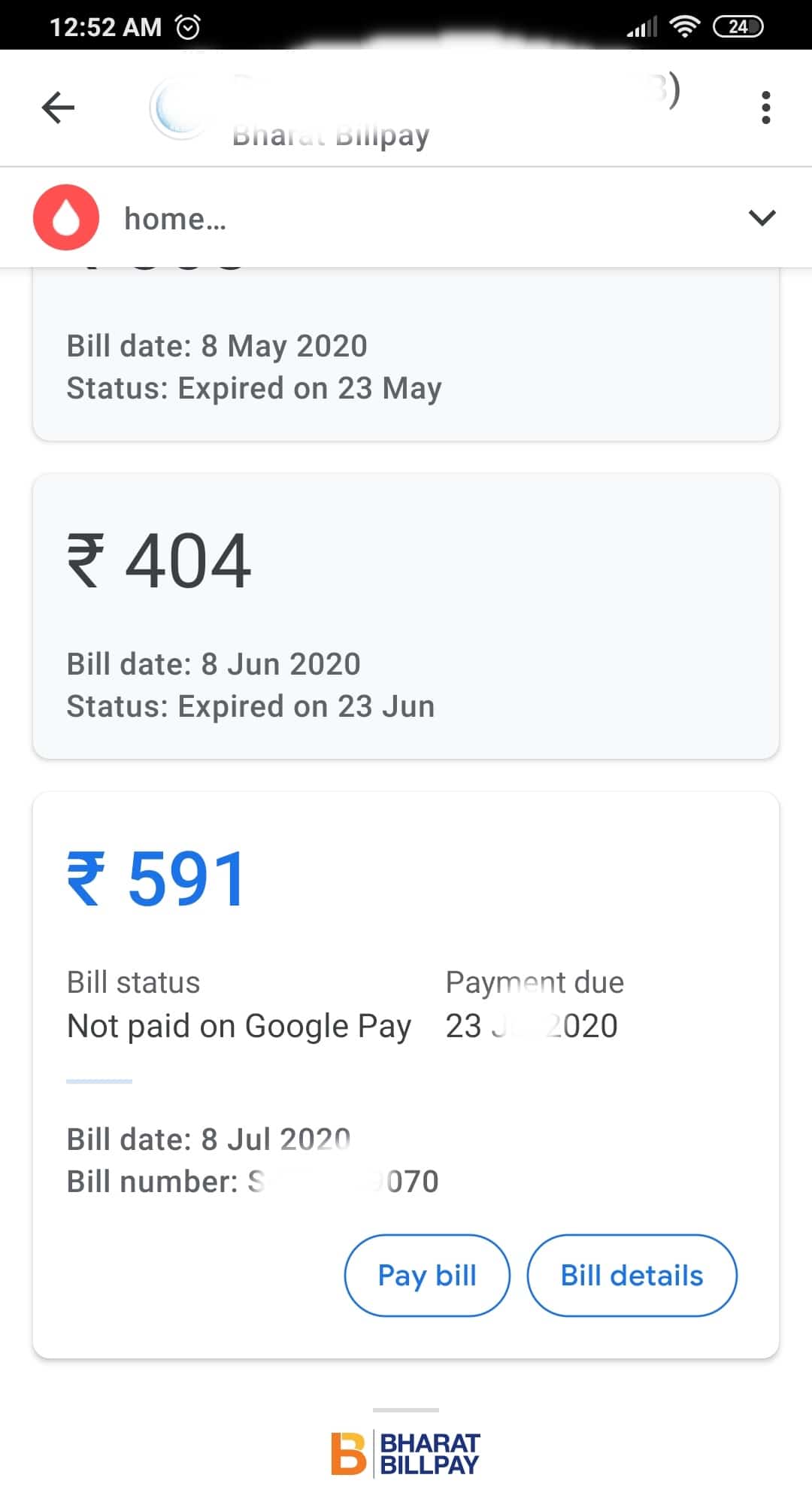
How to pay Kerala Water Authority bill payment Google Pay?
Step 1: Download the App (Android and iOS)
Step 2: Register and login
Step 3: Choose New Payment > Bill Payment > Water >
Step 4: Choose Kerala Water Author (KWA)
Step 5: Click on get started to link your account
Step 6: Enter your consumer id and add an account name such as home, work etc.
Step 7: Once you link the account, your outstanding bill amount will be displayed
Step 8: Click on pay bill and then Proceed to Pay
Step 9: Enter your PIN and the payment is done
You do not have to link your account every time to make Kerala Water Authority online bill payment using Google Pay.
Next time you make the payment, your linked account details with outstanding amount will be displayed. You can proceed to make payment.
Can I make KWA online payment using quick pay without registration?
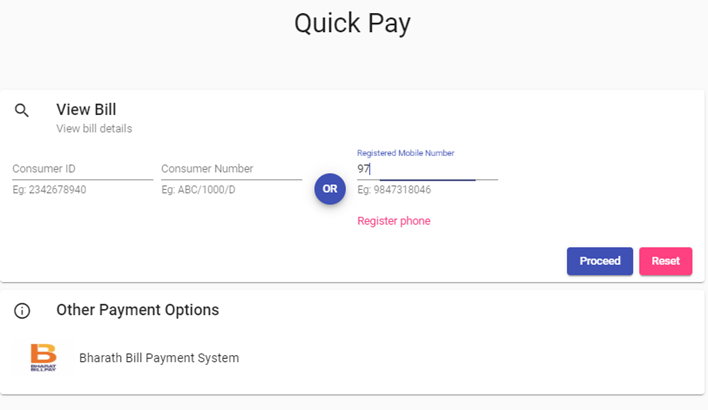
Step 1: Visit https://epay.kwa.kerala.gov.in/ to do KWA bill payment without registartion
Step 2: Enter any of the below to find your Kerala water bill :
1. Consumer id
2. Consumer number
3. Registered mobile number
Once you verify the below details, click Confirm Payment . Save the KWA bill payment receipt as PDF for future use.
How to do Kerala Water Authority bill payment online?
1.Quick Pay – Kerala Water Authority– use the KWA Quick Pay option to pay bill without log in.
2. https://www.bharatbillpay.com/Billpay.php – pay using Bharat Bill Pay or BPS
You can also use third-party apps like Google Pay, Paytm, PhonePe or automate the payment via SBI or Federal Bank. Please check the above FAQs to know more about each of these KWA water bill online payment method.
How to check your KWA bill details online?
Enter any of the details, consumer id, number or phone number, and then click on Proceed, your last generated KWA bill details will be displayed on the screen.
If you have outstanding payment, please go ahead make the payment. You can make payment here using KWA quick pay without login
How to find your consumer Id in KWA bill?
Go to https://epay.kwa.kerala.gov.in/, enter your registered mobile number and click on proceed. Your bill details including your KWA consumer id will be displayed on the screen. Check the above image for clarity.
You will need the consumer id to pay your Kerala Water Authority bill payment or file a complaint.
How to view KWA water bill?
1. Click on Quick Pay
2. Enter Consumer Id, Registered Mobile number or Consumer number
3. Click on proceed
Your outstanding bill details, due date etc. will be displayed on screen. You can pay the bill by clicking on proceed to pay.
What is Kerala water authority login portal?
How to find Kerala Water Authority consumer number?
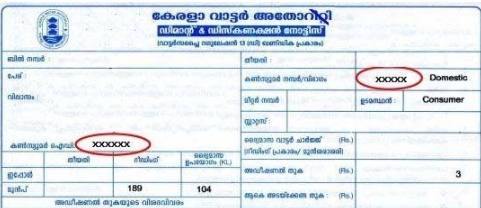
If you do not have a printed bill, you can find your KWA consumer number using your registered mobile number. Follow the below steps:
Go to KWA quick payment page – https://epay.kwa.kerala.gov.in/quickpay
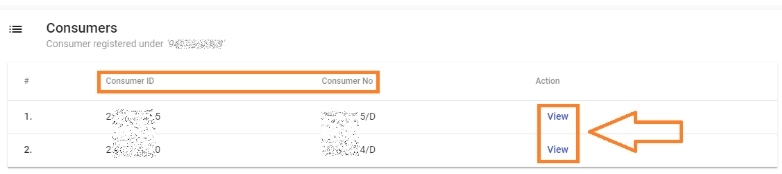
Enter your registered mobile number and then click proceed. A list of bill associated with the mobile number will be displayed on the screen, click view to se the detailed bill. Check the below images:
Is there a KWA online payment app?
How to download KWA online payment receipt?
Enter the OTP you received, and your Last KWA bill payment receipt will be displayed on the screen. Save your Kerala Water Authority bill payment receipt for future reference.
Kerala Water Authority Quick Pay (KWA Quick Pay) – Google Pay and PhonePe Comparison
Know how to do KWA online payment quick pay or Kerala Water Authority bill payment without login or registration:
You Might Want To Read
- Kerala Police Helpline Numbers
- Encumbrance Certificate In Kerala
- KSEB Bill Payment Online
- Marriage Certificate In Kerala

I have made online payment. Could not retrieve payment receipt. How to get the receipt now? pmgops@gmail.com.
Hi, I am trying to pay bill with Gapy app. My ID is KPD/18/D and showing not a valid id. Same for Phone pe. Can you please help?
Hello Bejy,
It looks like you are entering your “Consumer Number” instead of “Consumer ID” while trying to pay the bill. Once you enter your consumer ID, the KWA system should allow you to proceed with your payment. You can easily find your consumer ID from your bill or online using your registered mobile number. For guidance on how to find your “Consumer ID”, please check the FAQs in this post https://www.thecurrentindia.com/bill-payment/kwa-online-payment-kerala/
Hope this helps.
Best/ Team TCI
Today, I have received my Bill amount thru SMS. I have made advance payment and the current Bill amount of Rs.84/- is deducted and the balance is displayed in the SMS correctly. On logging in using my Mobile Number, how can I get the Bill for the last reading taken yesterday? The SMS has come today with the reading taken yesterday. But how can I generate the Bill and save it for future reference? Only the Bill History and Consumption are visible correctly. Not the current (I mean, last Bill) Bill. Please help.
Hi how can I get paper bill through the service person bcoz the representative tell that the paper bill is blocked by mistake.How can I unblock and start paper bill as previous