How to Apply For Online Passport in India – Fees, Documents, and Tracking
The online passport application or e-passport in India is now faster, simpler. Using the Passport Seva system, applicants can complete the online passport application, upload documents, book appointments.
Users can also do passport application status tracking online. All new ordinary passports are now issued as e-passports.
This guide explains how to apply for a passport online in India. It also discusses eligibility, fees, documents, the step-by-step application process, e-passport details, and tracking.
Read: Add Spouse Name In Indian Passport Online
Table of Contents
Who Can Apply for an Online Passport in India
- Only Indian citizens are eligible to apply.
- Adults (18 years and above) receive passports valid for 10 years.
- Minors receive passports valid for 5 years or until they turn 18.
- Consent from parents or legal guardians is mandatory for minors.
- All new ordinary passports are issued as e-passports with embedded chips.
What Is an e-Passport in India
An e-passport is a regular passport booklet with an embedded RFID chip that securely stores personal and biometric data.
Key benefits of an e-passport
- Higher security and protection against tampering
- Faster immigration checks
- Compliance with ICAO global standards
- Future readiness for automated airport e-gates
Applicants do not need to select a separate option—authorities issue e-passports automatically for new applications.
Read: PAN Card Name Correction – The Ultimate Guide
How to Apply for an Online Passport in India
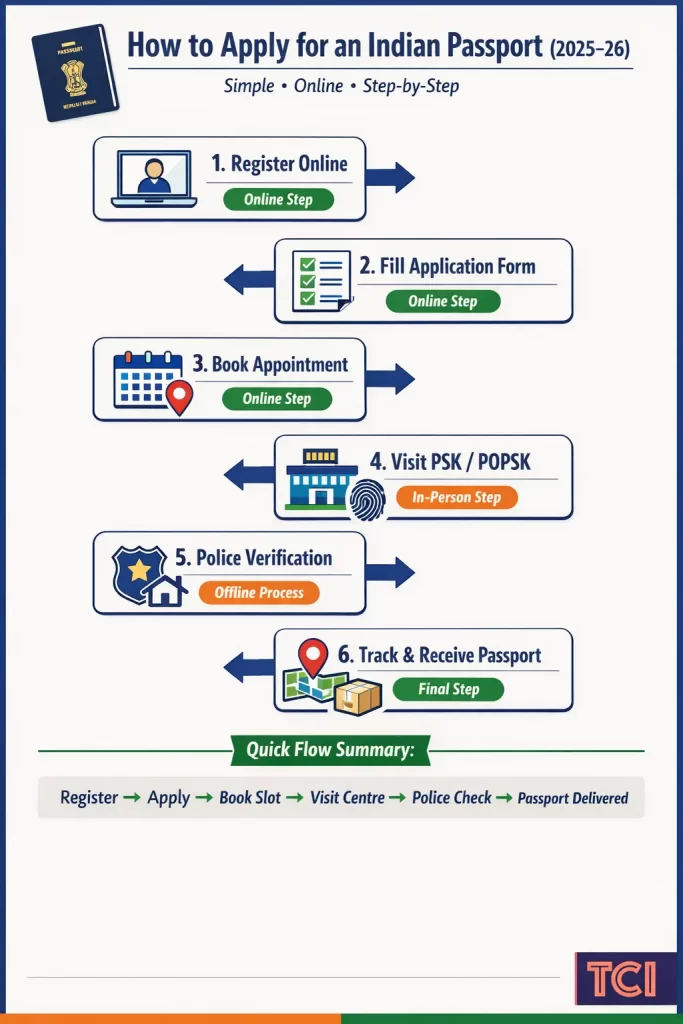
Step 1: Register on the Passport Seva Portal
Begin your online passport application by visiting the official Passport Seva Portal.
- Click “Register Now” and create an account using your name, email ID, and mobile number.
- Verify your email address and log in with your credentials.
- Using an Aadhaar-linked mobile number and email ID helps ensure smoother verification.
Step 2: Fill the Online Passport Application Form
After logging in:
- Select “Apply for Fresh Passport / Re-issue of Passport.”
- Choose the application type:
- Fresh Passport
- Re-issue / Renewal
- Select the service mode:
- Normal
- Tatkaal (urgent processing)
- Enter personal details, address, family information, and emergency contact details.
- Upload a digital photograph and signature if prompted.
Ensure all details exactly match your supporting documents to avoid delays.
Step 3: Pay Passport Fees and Book an Appointment
Pay the passport fee online using:
- Debit Card / Credit Card
- Net Banking
- UPI
- SBI e-Challan (offline)
Online Passport Application Fees in India
| Category | Normal Fee | Tatkaal Fee |
|---|---|---|
| Adult – 36 pages | ₹1,500 | ₹2,000 |
| Adult – 60 pages | ₹2,000 | ₹2,000 |
| Minor – 36 pages | ₹1,000 | ₹2,000 |
After payment, book an appointment at a Passport Seva Kendra (PSK) or Post Office Passport Seva Kendra (POPSK). The system generates an Appointment Reference Number (ARN)—save it for tracking.
Step 4: Visit PSK or POPSK for Verification
On the appointment day:
- Carry original documents along with self-attested photocopies.
- Officials capture biometrics (fingerprints) and photographs at the centre.
- Staff verify documents digitally and on the spot.
Commonly accepted documents
- Aadhaar Card
- Voter ID
- Birth Certificate
- PAN Card
- Utility bills or registered rent agreement (address proof)
Document requirements may vary by applicant category. Always check the portal before visiting.
Step 5: Complete Police Verification
- Most first-time applicants and some re-issue cases require police verification.
- A local police officer visits your residence to verify address and documents.
- Being available during verification helps avoid delays or adverse remarks.
Step 6: Track Passport Status and Delivery
- Track your application status online using the ARN on the Passport Seva Portal or the mPassport Seva App.
- Once approved, authorities dispatch the passport via Speed Post.
- Applicants can track delivery using India Post tracking.
Documents Required for an Online Passport Application
Proof of Identity (Any One)
- Aadhaar Card
- PAN Card
- Voter ID
- Driving Licence
- Government-issued photo ID
Proof of Address (Any One)
- Electricity, water, or telephone bill
- Income Tax Assessment Order
- Voter ID
- Gas connection proof
- Employer certificate on letterhead
- Spouse’s passport (address must match)
- Parent’s passport (for minors)
- Aadhaar Card
- Registered rent agreement
- Bank passbook (scheduled banks only)
Proof of Date of Birth
Applicants born before 1 October 2023 (any one):
- Birth certificate
- School leaving or matriculation certificate
- PAN Card
- Driving Licence
- Voter ID
- LIC or public insurance policy bond
- Government service record or pension order
Applicants born on or after 1 October 2023:
- Birth certificate only (mandatory)
Online Passport Tracking: How to Check Status
Applicants can monitor progress at every stage using online passport tracking tools.
- Passport Seva Portal: Track application status using File Number and Date of Birth
- mPassport Seva App: Check processing and police verification updates
- India Post: Track delivery once dispatched
These are the only official platforms for tracking passport applications in India.
Common Passport Mistakes to Avoid
Mistakes
- Torn or missing pages
- Water or moisture damage
- Peeling laminate on the photo page
- Stains or marks near personal details
- Loose binding or damaged spine
- Passport nearing expiry
- Insufficient blank pages
- Stickers, notes, or alterations
Tips
- Use a protective passport cover
- Renew well before expiry
- Keep pages clean and intact
- Never laminate or modify the passport
- Inspect the booklet before international travel
Key Points to Remember for Online Passport Applications
- India now issues e-passports by default
- The online passport application covers almost all steps
- Fees depend on age, pages, and service type
- Accurate details reduce processing time
- Online passport tracking improves transparency
Read: Link Mobile Number with Aadhaar Card: Process, Charges
FAQs on E-Passport/ Online Passport Application
Which websites allow online passport download services in India?
No apps and sites will allow online passport download services in India. However, Official government platforms allow passport-related downloads:
1. Passport Seva Portal – for application forms, appointment receipts, and status details
2. DigiLocker – for storing and accessing verified passport-related documents (when available)
Is it possible to download a digital copy of my passport after approval?
No. The Government of India does not provide a downloadable PDF or scanned copy of the Indian passport.
The physical passport booklet remains the only valid travel document, even after approval.
However, passport details may appear in DigiLocker for reference purposes, but this does not replace the physical passport.
Are there official apps for downloading Indian passport documents?
The mPassport Seva App is the only official passport-related mobile app.
It allows users to:
1. Track passport application status
2. Check police verification updates
3. Access passport service information
The app does not allow downloading a digital passport copy. Any app claiming otherwise is unofficial.
How does police verification happen for a passport in India?
Police verification confirms the applicant’s identity and address. Most first-time applicants and some re-issue cases require verification
1. After your PSK/POPSK visit, the application moves to the local police station
2. A police officer may visit your residence to verify address and documents
3. In some cases, verification happens at the police station instead
4. Being present and providing correct documents helps complete verification faster
5. Once verification is clear, the passport moves to printing and dispatch.
What are the fees for getting a passport through an online application in India?
Passport fees depend on age, number of pages, and service type.
1. Adult (36 pages): ₹1,500
2. Adult (60 pages): ₹2,000
3. Minor (36 pages): ₹1,000
4. Tatkaal service: Additional ₹2,000
Fees are paid online during the application process.
Can I renew my Indian passport online without visiting a passport office?
No. You can apply for renewal online, but you must visit a Passport Seva Kendra (PSK) or Post Office Passport Seva Kendra (POPSK) for biometrics and document verification.
What documents do I need to upload for an online passport application in India?
You usually upload scanned copies of:
1. Proof of identity (Aadhaar, PAN, Voter ID, etc.)
2. Proof of address (Aadhaar, utility bill, rent agreement, etc.)
3. Proof of date of birth (birth certificate, school certificate, PAN, etc.)
Exact requirements depend on your category and are shown on the portal.
Which companies provide online passport photo services accepted by Indian passport authorities?
The Passport Seva system does not officially approve any private companies for passport photos. However, service provider like GK Vale should be able to help you get passport size photos with the right size.
Photos are usually taken at the PSK/POPSK. If you upload a photo, it must meet the size and background rules mentioned on the portal.
What is the average processing time for an online passport application in India?
1. Normal service: 7–21 working days
2. Tatkaal service: Faster, subject to verification
Processing time depends on document accuracy and police verification.
Is there an online service that helps fill out Indian passport application forms automatically?
No official government service fills the form automatically. Applicants must enter details themselves on the Passport Seva Portal. Avoid third-party sites that claim to auto-fill forms, as they are not authorized.
Final Word
The online passport system has made passport services in India more efficient, secure, and accessible. With e-passports, digital verification, and real-time tracking, applicants who follow the process carefully can expect a smooth experience.
Source: Passport Seva
Other Useful Information
