How to Link Mobile Number with Aadhaar Card – A Step-by-Step Guide
You need to link mobile number with Aadhaar card to receive OTPs, complete identity verification, access banking services, and use government portals without interruption. A linked mobile number plays a key role in Aadhaar authentication and official communication.
So, let’s find out what is the process to update your mobile number linked to my unique ID.
Table of Contents
Link Mobile Number with Aadhaar Card: Important Things You Should Know
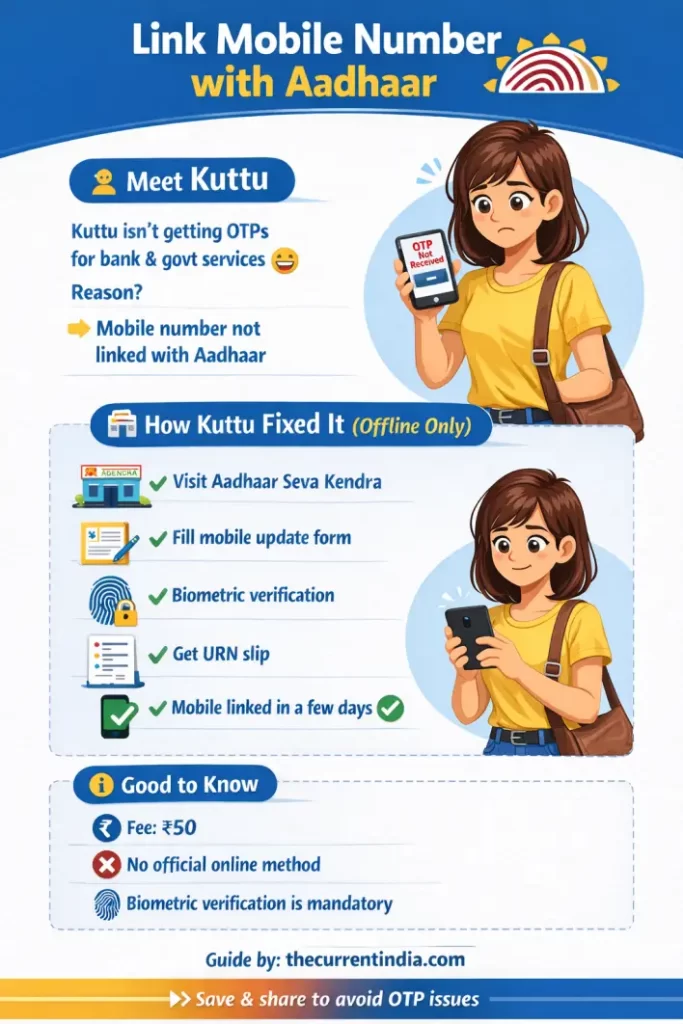
Many users look for ways to link mobile number with Aadhaar card online. However, no online method exists for this process.
Instead, Aadhaar requires you to complete mobile number linking offline through biometric verification at an authorized Aadhaar center.
Any website, app, SMS service, or agent claiming to offer mobile no link Aadhaar card online does not follow the official procedure.
If you are updating other Aadhaar details as well, you may find this related guide helpful: Aadhar Card Correction Online: How to Update Name, Address, DOB, Mobile & More
What Are The Steps to Link My Mobile Number with Aadhar Card?
If your Aadhaar does not have a registered mobile number, you can still link one easily. However, you must complete this process offline.
To begin, visit an authorized Aadhaar enrollment or update center. Aadhaar does not allow online linking because biometric authentication is mandatory for identity verification.
Step-by-Step Process to Link Mobile Number with Aadhaar Card
Follow these steps to link your mobile number with Aadhaar safely and correctly.
- Visit your nearest Aadhaar Seva Kendra or authorized enrollment center.
- Request the Aadhaar mobile number update or linking form.
- Enter your Aadhaar number and the mobile number you want to link.
- Submit the completed form to the operator.
- Complete biometric verification using your fingerprint or iris scan.
- Collect the acknowledgment slip with the Update Request Number for tracking.
After submission, the system processes your mobile no link Aadhaar card request.
How to Book Appointment to Link Mobile Number with Aadhaar Card
To reduce waiting time, you can book an appointment online before visiting the Aadhaar center.
Appointment booking helps manage queues and speeds up the visit. However, it does not allow you to link mobile number with Aadhaar card online. You must still complete biometric verification in person.
Read: PAN Card Name Correction – The Ultimate Guide
What are the Charges to Link Mobile Number with Aadhaar Card
In most cases, linking or updating a mobile number with Aadhaar involves a service charge.
Currently, Aadhaar centers charge approximately ₹50 for this service.
The same fee applies whether you link a mobile number for the first time or change an existing one.
Authorities may revise charges from time to time, so it is best to confirm at the center.
How to Change Mobile Number Linked with Aadhaar Card
If your Aadhaar already has a mobile number and you want to change it, follow the same offline process.
- Visit an authorized Aadhaar center.
- Submit a mobile number update request.
- Complete biometric verification.
Aadhaar does not offer any online option to change or update the registered mobile number.
Advantages of Linking Mobile Number with Aadhaar Card
Linking your mobile number with Aadhaar card offers several practical benefits.
- You receive OTPs for Aadhaar authentication and updates.
- You can access banking, PAN, and government services more easily.
- You receive alerts related to Aadhaar activity.
- Your identity verification becomes faster and more secure.
In addition, a linked mobile number helps you use services like DigiLocker and passport applications.
Myths vs Facts: Link Mobile Number with Aadhaar Card
Myth: You can link your mobile number with Aadhaar card online from home.
Fact: Aadhaar does not support online mobile number linking. You must complete biometric verification at an Aadhaar center.
Myth: You can link Aadhaar mobile number through SMS or a mobile app.
Fact: SMS and mobile apps do not support mobile number linking or updates. You must visit an authorized center in person.
Myth: Telecom stores or local agents can link mobile number with Aadhaar.
Fact: Only authorized Aadhaar enrollment or update centers can perform this service. Telecom stores cannot link Aadhaar details.
Myth: Linking mobile number with Aadhaar is always free.
Fact: Aadhaar centers usually charge a small service fee for mobile number updates.
Myth: You will receive a printed Aadhaar card after linking your mobile number.
Fact: Mobile number updates do not trigger a new physical Aadhaar letter. Aadhaar sends confirmation through SMS.
Interesting Reads
- Guide to Add Spouse Name in Indian Passport Online
- International Driving License
- Driving License Online
FAQs on Linking Mobile Number with Aadhaar Card
Can I link my mobile number with Aadhaar through a mobile app?
No. Aadhaar does not allow mobile number linking through any mobile app. You must complete biometric verification at an Aadhaar center.
What documents are required to link mobile number with Aadhaar?
You do not need any documents. Aadhaar requires only your Aadhaar number and biometric authentication.
Is it free to link my mobile number with Aadhaar at telecom stores?
No. Telecom stores do not offer Aadhaar mobile linking services. Only authorized Aadhaar centers can process this request, and a service charge usually applies.
How long does it take to update mobile number after linking with Aadhaar?
The update usually takes a few working days. For example, 7 to 30 days. You can track the status using the Update Request Number provided at the center.
Can I link my mobile number with Aadhaar using biometric verification?
Yes. Aadhaar requires biometric verification to link or update a mobile number.
Are there any charges for linking mobile number with Aadhaar via SMS?
No. Aadhaar does not support mobile number linking through SMS, so no charges apply.
Is it mandatory to link my mobile number with Aadhaar?
No, Aadhaar does not legally require you to link a mobile number. However, many Aadhaar-based services need a registered mobile number. Without it, you may face service limitations.
Can I update my Aadhaar card mobile number online without OTP?
No. Aadhaar does not allow mobile number updates online, with or without OTP. You must complete biometric verification at an authorized Aadhaar center.
Can we add a new mobile number in an Aadhaar card?
Yes. You can add a new mobile number at any time by visiting an authorized Aadhaar center. The process requires biometric authentication, and a service fee may apply.
How can I know my mobile number linked with Aadhaar without OTP?
You cannot check the linked mobile number without OTP. If you no longer have access to the registered number, visit an Aadhaar center and update your mobile number through biometric verification.
Editor’s Note: This article uses publicly available official procedures and reflects information reviewed for accuracy to the best of our knowledge. Aadhaar update rules may change over time, so users should verify details at authorized Aadhaar centers before proceeding.
Source: Unique Identification Authority of India
You May Like
